版本 1: 发布到 npm
适合绝大多数 npm 包场景。此 Workflow 只发布到 npmjs.org,配置简单,安全高效。
流程说明
- 配置
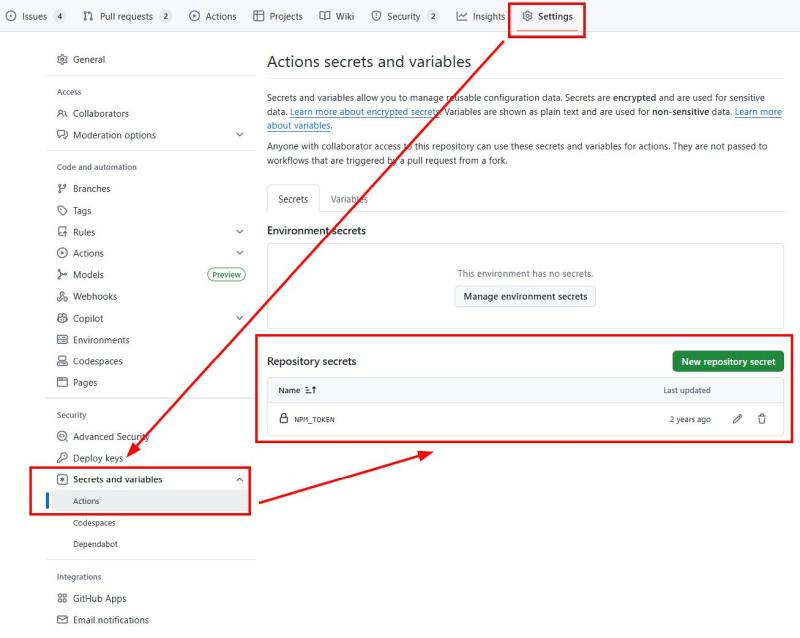
NPM_TOKEN: GitHub → Settings → Secrets and variables → Actions → Repository secrets。 - 流程清晰: 测试 → 构建 → 发布 npm → 打 Tag。
.github/workflows/publish-npm.yml:
name: Publish npm Packages

env:
  NODE_VERSION: '20'

on:
  push:
    branches:
      - main
  pull_request:
    branches:
      - main
  workflow_dispatch:

jobs:
  test:
    runs-on: ubuntu-latest
    steps:
      - name: Checkout code
        uses: actions/checkout@v4

      - name: Setup Node.js
        uses: actions/setup-node@v4
        with:
          node-version: ${{ env.NODE_VERSION }}

      - name: Install dependencies
        run: npm install

      - name: Build package
        run: npm run build --if-present

      - name: Run tests
        run: npm test

  publish:
    needs: test
    runs-on: ubuntu-latest
    if: github.event_name == 'push'
    steps:
      - name: Checkout code
        uses: actions/checkout@v4

      - name: Setup Node.js
        uses: actions/setup-node@v4
        with:
          node-version: ${{ env.NODE_VERSION }}
          registry-url: 'https://registry.npmjs.org/'

      - name: Install dependencies
        run: npm install

      - name: Build package
        run: npm run build --if-present

      - name: Publish to npm
        env:
          NODE_AUTH_TOKEN: ${{ secrets.NPM_TOKEN }}
        run: npm publish --access public

      - name: Create git tag for version
        if: success()
        run: |
          VERSION=$(node -p "require('./package.json').version")
          git config user.name "github-actions[bot]"
          git config user.email "41898282+github-actions[bot]@users.noreply.github.com"
          git tag -a "v$VERSION" -m "Release v$VERSION"
          git push origin "v$VERSION"
版本 2: 同时发布到 npm 和 GitHub Packages
将包同步分发到 GitHub Packages,可用下述 Workflow。对比版本 1,新增了 GitHub Packages 配置。
流程说明
- GitHub Packages 需要额外配置
.npmrc和包名 (如@user/project)。 - 发布前需确保有
GITHUB_TOKEN(GitHub Actions 默认提供无需设置)。 - 使用脚本
scripts/change-package-name.js自动切换包名。
scripts/change-package-name.js:
const fs = require('fs');

const newName = process.argv[2];
if (!newName) {
  console.error('Error: New name argument is required.');
  process.exit(1);
}

const pkgPath = 'package.json';
const pkg = JSON.parse(fs.readFileSync(pkgPath, 'utf8'));
pkg.name = newName;
fs.writeFileSync(pkgPath, JSON.stringify(pkg, null, 2));
console.log(`package.json name changed to "${newName}"`);.github/workflows/publish-npm.yml:
name: Publish npm Packages

env:
  NODE_VERSION: '20'
  PROJECT_NAME: 'mazey-npm-template'

on:
  push:
    branches:
      - main
  pull_request:
    branches:
      - main
  workflow_dispatch:

jobs:
  test:
    runs-on: ubuntu-latest
    steps:
      - name: Checkout code
        uses: actions/checkout@v4

      - name: Setup Node.js
        uses: actions/setup-node@v4
        with:
          node-version: ${{ env.NODE_VERSION }}

      - name: Install dependencies
        run: npm install

      - name: Build package
        run: npm run build --if-present

      - name: Run tests
        run: npm test

  publish:
    needs: test
    runs-on: ubuntu-latest
    if: github.event_name == 'push'
    steps:
      - name: Checkout code
        uses: actions/checkout@v4

      - name: Setup Node.js
        uses: actions/setup-node@v4
        with:
          node-version: ${{ env.NODE_VERSION }}
          registry-url: 'https://registry.npmjs.org/'

      - name: Install dependencies
        run: npm install

      - name: Build package
        run: npm run build --if-present

      - name: Publish to npm
        env:
          NODE_AUTH_TOKEN: ${{ secrets.NPM_TOKEN }}
        run: npm publish --access public

      - name: Configure .npmrc for GitHub Packages
        run: |
          echo "@${{ github.actor }}:registry=https://npm.pkg.github.com/" > .npmrc
          echo "//npm.pkg.github.com/:_authToken=${{ secrets.GITHUB_TOKEN }}" >> .npmrc

      - name: Publish to GitHub Packages
        if: success()
        env:
          NODE_AUTH_TOKEN: ${{ secrets.GITHUB_TOKEN }}
        run: |
          node scripts/change-package-name.js "@${{ github.actor }}/${{ env.PROJECT_NAME }}"
          npm publish --registry=https://npm.pkg.github.com/

      - name: Restore modified files
        if: always()
        run: git checkout -- package.json .npmrc

      - name: Create git tag for version
        if: success()
        run: |
          VERSION=$(node -p "require('./package.json').version")
          git config user.name "github-actions[bot]"
          git config user.email "41898282+github-actions[bot]@users.noreply.github.com"
          git tag -a "v$VERSION" -m "Release v$VERSION"
          git push origin "v$VERSION"
分支命名示例
1. 只监听主分支 main:
on:
  push:
    branches:
      - main
  pull_request:
    branches:
      - main
2. 监听所有以 release/v 开头的分支 (如 release/v1.0.0、release/v2.1.3 等):
on:
  push:
    branches:
      - 'release/v*'
  pull_request:
    branches:
      - 'release/v*'
建议:
main: 对于仅用于主干发布的项目,直接监听main即可。release/v*: 带有版本号的格式 (如release/v1.2.3)。这种命名方式相对清晰,能标识每次发布的具体版本号,同时也便于自动化脚本或 CI 流程处理不同版本的发布。
注意:
- 含有
*的分支名建议加单引号,避免 YAML 解析异常。 - 只有被
branches匹配到的分支推送 (push) 或拉取请求 (pull_request) 会触发 Workflow。
版权声明
本文为原创文章,作者保留版权。转载请保留本文完整内容,并以超链接形式注明作者及原文出处。
作者: 除除
原文: http://blog.mazey.net/5954.html
(完)